The numbers that matter, visible
See the KPIs, trends, exceptions, and overdue items that currently take time to calculate or find.
Custom Google Sheets dashboards
Keep updating the same spreadsheet. I'll turn those rows into clear KPIs, charts, search, filters, and automatic reports without forcing your team into another software platform.
Free one-page recommendation. No call required.
Staff keeps the sheetThe familiar workflow stays intact
Owners get the answersKPIs and exceptions in one clear view
Reports stop being rebuiltUpdates and summaries can run automatically
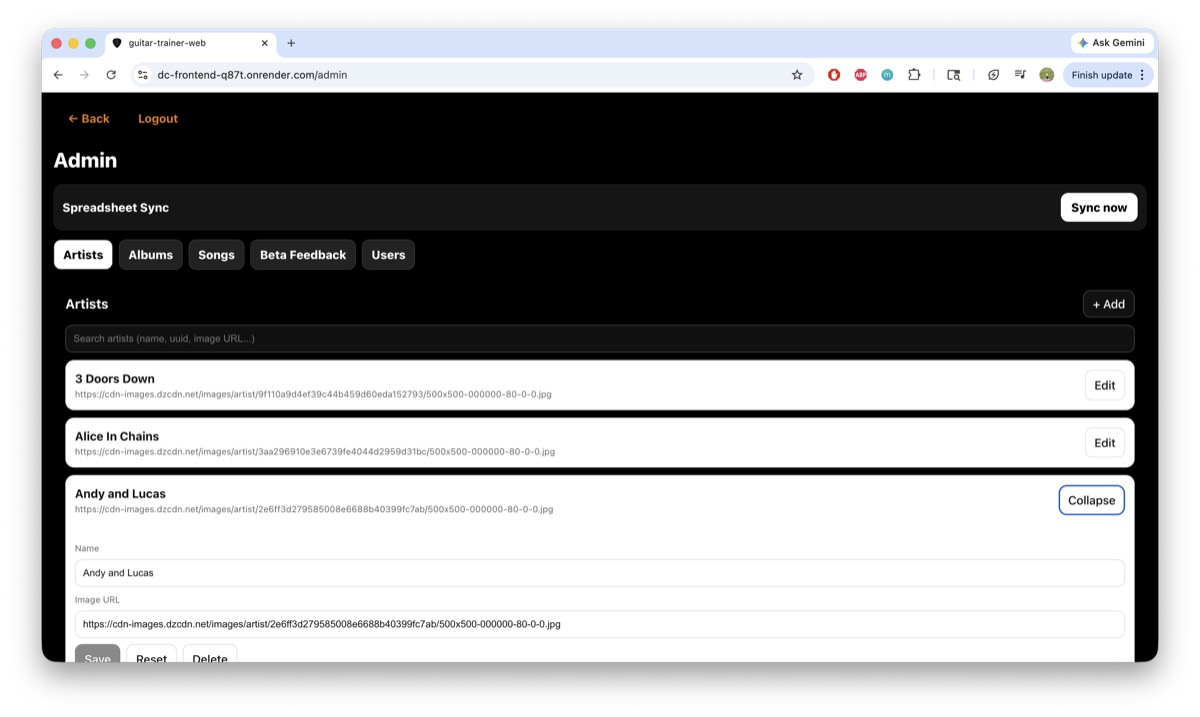
Built from a real workflow
A guitar education business was manually organizing every new lesson. I connected the existing spreadsheet to a custom admin system that publishes the content with one action.
“Now I can create the sheet music and push a button for everything to be readily available on the site.”
What your dashboard can do
Start with one useful view built around the questions you ask every week. Add other systems only when they improve a real decision.
See the KPIs, trends, exceptions, and overdue items that currently take time to calculate or find.
Your team keeps updating familiar rows while the dashboard turns the latest data into a clear management view.
Find a customer, project, registration, or invoice without digging through tabs or building another temporary report.
Add scheduled summaries or alerts when the right people need the numbers without another copy-and-paste routine.
Sales
Know what changed, what is at risk, and who needs attention.
Operations
Give managers one current view instead of another status meeting.
Memberships
See the health of the program without combining tabs by hand.
What changes
The expensive part is usually not the sheet. It is collecting updates, calculating the same numbers, checking exceptions, and rebuilding a report before anyone can make a decision.
Before
After
A focused first build
Send a copy or screenshot of the sheet. I'll map the useful view, explain what should update automatically, and provide a fixed scope before any paid work begins.
Free first stepOne-page dashboard plan
First versionAbout 10 business days
Starting pointYour existing Google Sheet
Before the buildFixed scope and quote
FAQ
No. The first version is usually built around the sheets your team already understands. The goal is to remove reporting work, not force a new process on everyone.
Common examples include sales, customers, pipeline, invoices, projects, registrations, attendance, inventory, and weekly operating KPIs. The first version focuses on one useful management view rather than rebuilding the whole business at once.
Usually, yes. The first sprint starts with one report and can include another system when it is a necessary source for that report. Larger integrations can be scoped separately after the first workflow is working.
A focused dashboard can usually reach a first working version within 10 business days after I have access to the current spreadsheet and understand the decisions it needs to support.
The scope depends on the data, dashboard views, and other systems involved. The free dashboard plan identifies the smallest useful version, and you receive a fixed scope, timeline, and quote before deciding whether to build it.