The short answer
Track the customer action closest to revenue
Every small business should review Google Business Profile searches, views, website clicks, calls, direction requests, bookings or messages, and reviews. But do not give every number equal weight. A contractor should care most about qualified calls. A restaurant may care more about directions. A salon may care most about completed bookings.
The useful question is not simply, “Did this number go up?” It is, “Did more people take the action that can become revenue?”
Google visibility only matters when it creates customer action
A profile can receive more views without producing more calls, visits, appointments, or sales. That is why a useful monthly scorecard should follow the path from discovery to action.
Google's Performance report can show discovery and interaction metrics. Your sales, booking, or payment process must answer what happened after those interactions.
The monthly scorecard
The 7 Google Business Profile metrics to review
Searches and search terms
What it tells you: The words people used when your Business Profile appeared in Google Search or Maps.
What to watch: Whether the searches match services you actually sell and whether high-value searches are becoming more common.
What to do next: Improve the matching service pages, profile categories, services, and business description before chasing more general visibility.
Profile views
What it tells you: The number of unique people who viewed your Business Profile on Google Search or Maps.
What to watch: Month-over-month direction and whether stronger visibility produces more customer actions.
What to do next: If views rise while calls and clicks stay flat, improve the offer, photos, services, hours, and next step shown on the profile.
Website clicks
What it tells you: How often someone clicked from your Business Profile to your website.
What to watch: Whether the website receives more qualified visits as profile visibility grows.
What to do next: Send visitors to a page that matches what they searched for and offers one obvious way to contact or buy from you.
Calls
What it tells you: How often someone clicked the call button on your Business Profile.
What to watch: Call volume, missed calls, response time, and how many calls become appointments or sales.
What to do next: If calls arrive but revenue does not, improve call coverage and track what happens after each inquiry.
Direction requests
What it tells you: How often someone asked Google for directions to your location.
What to watch: Changes around events, promotions, seasons, and the areas where customers begin their trips.
What to do next: Compare direction requests with visits or sales. A request shows intent, but it does not prove someone arrived.
Bookings and messages
What it tells you: Direct conversations or completed bookings attributed to the profile when those features apply to your business.
What to watch: How many turn into attended appointments, qualified opportunities, or paying customers.
What to do next: Create a consistent response and follow-up process so valuable inquiries do not disappear after the first action.
Review count and average rating
What it tells you: The volume and overall rating of the public reviews displayed on your profile.
What to watch: New review pace, recurring complaints, and whether recent reviews support the service you want to sell.
What to do next: Ask satisfied customers at a consistent moment and route recurring complaints back into an operational improvement.
A common mistake
Views are not leads
Imagine a local service business growing from 1,000 to 1,500 profile views in one month. That looks encouraging. But website clicks stay at 20 and calls fall from 12 to 9.
Visibility increased by 50%, but customer action became weaker. The next move is not automatically “get more views.” The owner should review which searches produced the visibility and whether the profile gives those people a compelling next step.
Build a one-page monthly Google Business scorecard
Record the numbers on the same day each month and use the same date range. Then add the result the profile cannot provide on its own: qualified inquiries, appointments, store visits, or revenue.
| Measure | This month | Last month | Question to answer |
|---|---|---|---|
| Profile views | 1,500 | 1,000 | Are more people finding us? |
| Calls | 18 | 12 | Are more people contacting us? |
| Qualified inquiries | 9 | 8 | Are the new contacts a good fit? |
| New customers | 3 | 4 | Are inquiries becoming revenue? |
This small funnel is more useful than a page full of disconnected numbers. It shows where attention stops becoming business.
Use the scorecard to make one decision each month
- Compare the same date range with the previous month.
- Find the largest meaningful change, not the largest number.
- Connect the change to inquiries, customers, or revenue.
- Choose one improvement to test during the next month.
- Record the result before making another change.
Free Google Sheets template
Put the seven metrics into one simple dashboard
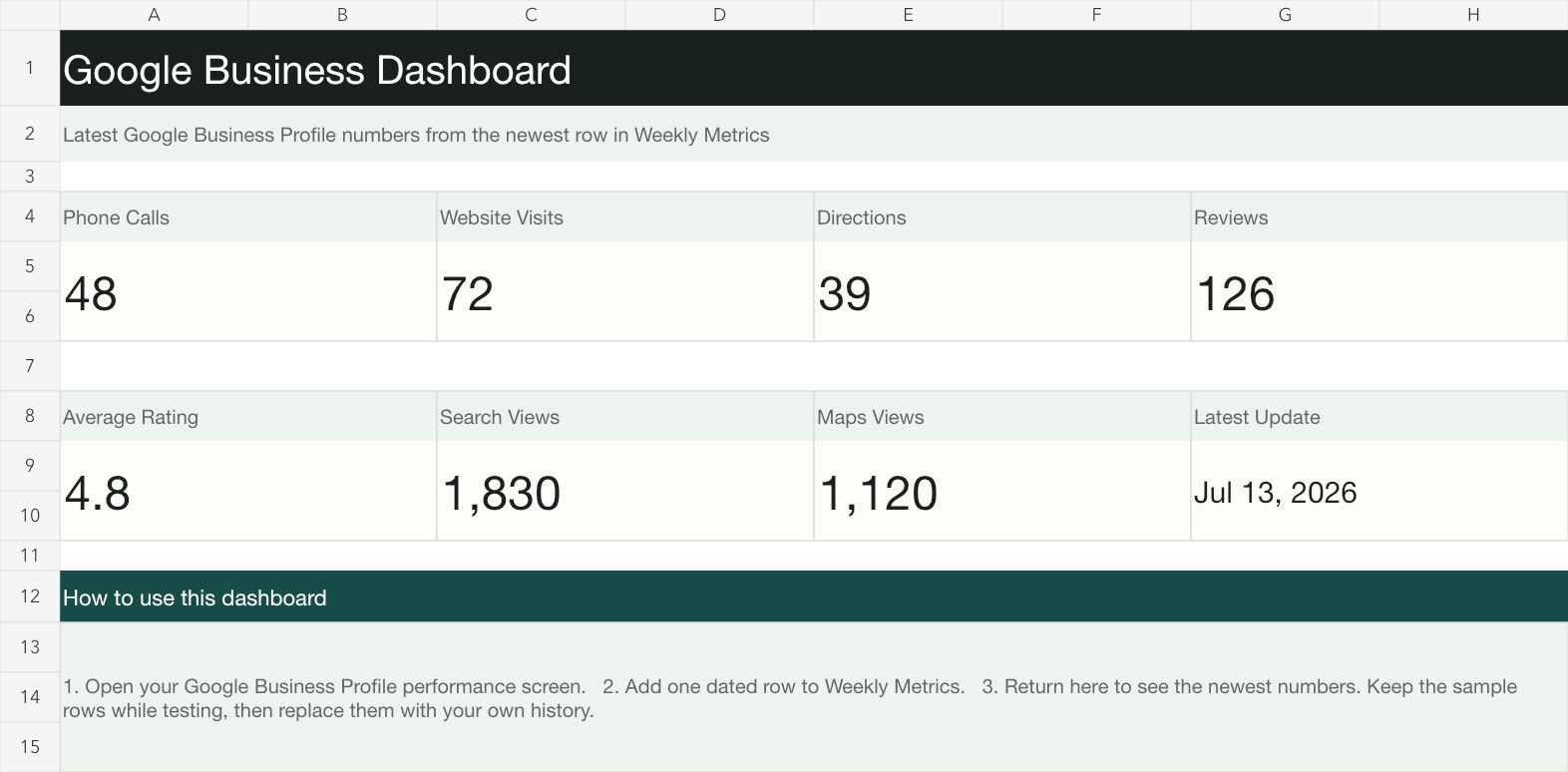
The free template gives you a Dashboard tab and a dated Weekly Metrics tab. The setup guide shows how to find the numbers, create a useful history, and automate the connection later.
Frequently asked questions
Google Business Profile metrics FAQ
What is the most important Google Business Profile metric?
The most important metric is the action closest to revenue for your business. That may be calls for a contractor, bookings for a salon, direction requests for a store, or website clicks for a professional service.
How often should I review Google Business Profile performance?
Review the main numbers once a month using the same date range. Businesses that depend heavily on calls, messages, or bookings should also monitor unanswered inquiries each week.
Does Google Business Profile show how much revenue it generated?
Not by itself. The profile shows discovery and interaction data. To measure revenue, connect those inquiries with your booking, sales, customer, or payment records.
Can I track Google Business Profile metrics in Google Sheets?
Yes. You can copy the newest numbers into a dated row each month or build an automatic connection. A consistent Google Sheet gives you a useful history even before automation is necessary.
Done-for-you dashboard
Connect Google visibility to actual business results
Ravert Systems can build a dashboard that combines Google Business Profile activity with the inquiries, appointments, or sales your existing systems already track.
- Automatic performance history
- Multiple business locations
- Inquiry and customer outcomes
- Monthly or weekly email summaries
Source
Google's performance definitions
Metric availability varies by business. Google documents profile views, searches, interactions, calls, website clicks, direction requests, messages, and bookings in its official performance guide. Review count and average rating appear on the Business Profile itself.
Read Google's Business Profile performance guide